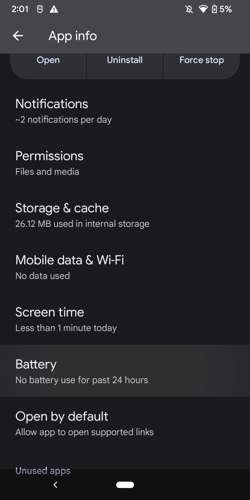
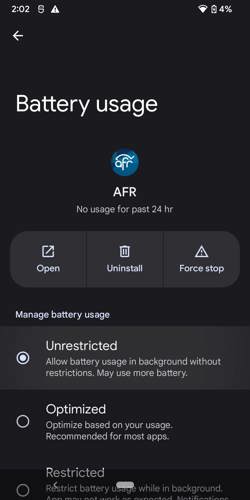
If the AFR Android app stops working in the background or when the screen goes off, it may be because your phone has put it in a background or sleeping mode that restricts its functioning. To resolve this issue, refer to the steps below.
Samsung
1. Open Settings
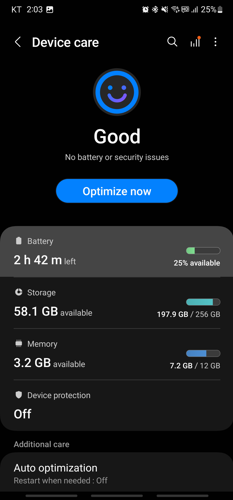
2. Click Battery and device care
3. Click Battery
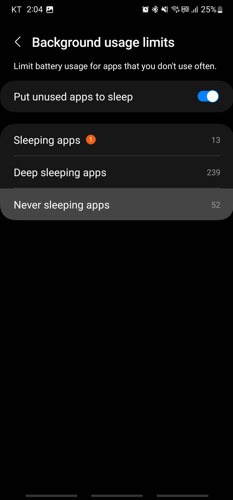
4. Click Background usage limits
5. Click Never sleeping apps
6. Click the plus(+) button
7. Select AFR
8. Click the Add button
9. Go Back to the main settings page
10. Click Apps
11. Select AFR
12. Click Battery
13. Click on the checkbox for Unrestricted
2. Click Battery and device care
3. Click Battery
4. Click Background usage limits
5. Click Never sleeping apps
6. Click the plus(+) button
7. Select AFR
8. Click the Add button
9. Go Back to the main settings page
10. Click Apps
11. Select AFR
12. Click Battery
13. Click on the checkbox for Unrestricted




Most other manufacturers
1. Open settings
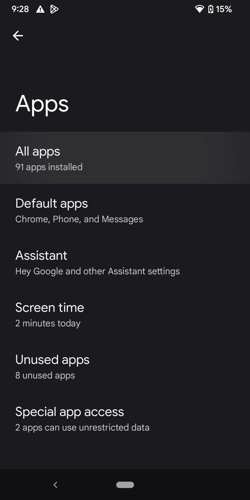
2. Click apps
3. Click All apps or See all ### apps
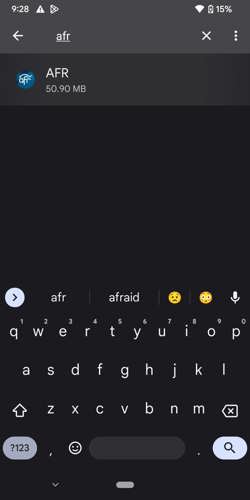
4.Search for and click on AFR
5.Click Battery or App Battery Usage
6.Click Unrestricted
2. Click apps
3. Click All apps or See all ### apps
4.Search for and click on AFR
5.Click Battery or App Battery Usage
6.Click Unrestricted

Related Topics
Contact AFA App Support
Send an email to [email protected] with a description of your problem and the Manufacturer and Model of your phone.
Latest Podcasts
The Dr. Nurse Mama Show With Jessica Peck
Dr. Dave Keehn talks with Jessica about how grief can reshape, refine, and mature us.
Monday, October 19, 2026
At The Core With Walker Wildmon and Rick Green
(A "Best Of" from July 27, 2026) Lies Grabbing Folks By the Nose Leading Them Down the Wrong Path | Socialists Continue Down Handout Lane | Are We In a Housing Crisis?
Monday, October 19, 2026
Jenna Ellis in the Morning
France is burning. Socialism lit the match.
Monday, October 19, 2026
Today's Issues With Tim Wildmon and Company
France Riots Raise Questions About Immigration and National Identity
Monday, October 19, 2026
A Disciple's View With Todd Herman
The Godless Party: A Call for Godly Governance
Monday, October 19, 2026